
Introduction
A message lands in your inbox: “Your Coinbase account has been locked.” Your stomach drops, your thumb hovers over the link, and for one split second, panic wins. That is exactly how coinbase spam is designed to work.
Fake Coinbase emails, text messages, phone calls, and support alerts are not just annoying. They can lead to stolen passwords, drained crypto accounts, fake wallet transfers, identity theft, and emotional stress that lasts far longer than the message itself.
Coinbase says real emails from Coinbase never ask for your password, 2-step verification codes, or remote access to your computer, and that Coinbase email addresses end with “coinbase.com.”
This guide walks you through how these scams usually look, why they feel convincing, what to do when you receive one, and how to protect your account without making fear-based decisions.
What Is coinbase spam?
coinbase spam refers to unwanted or suspicious messages that pretend to be from Coinbase or use Coinbase’s name to trick people into clicking links, sharing sensitive information, calling fake support numbers, or moving crypto.
These messages can arrive through email, SMS, social media, messaging apps, browser pop-ups, calendar invites, phone calls, or even fake ads. Some are obvious. Others look polished, urgent, and surprisingly believable.
A Simple Definition
coinbase spam is any unwanted or deceptive message that uses Coinbase branding, language, or account-related fear to push the recipient into an unsafe action.
That unsafe action may include:
- Clicking a fake login link
- Entering a password on a fake website
- Sharing a 2FA code
- Calling a scam phone number
- Installing remote-access software
- Moving crypto to a “safe” wallet
- Approving a suspicious wallet transaction
- Sending identity documents to a fake support portal
The message may say your account is frozen, your funds are at risk, a withdrawal is pending, or identity verification has failed. The theme changes, but the goal is usually the same: rush you before you think.
Why Coinbase Is Often Impersonated
Coinbase is one of the most recognized crypto platforms, so scammers use the name because people know it. A fake message from an unknown exchange may be ignored. A fake message from Coinbase feels more urgent, especially if the recipient has used the platform before.
The scam works even when the person does not have a Coinbase account. The message creates curiosity or fear: “Did someone open an account in my name?” That reaction can still lead someone to click.
Why coinbase spam Feels So Convincing
Scammers do not rely only on bad spelling and obvious tricks anymore. Many fake messages now copy brand colors, support language, security wording, and layout styles from real companies.
A convincing scam often blends three things: urgency, familiarity, and fear. It looks familiar enough to trust, urgent enough to rush, and frightening enough to override your normal caution.
The Psychology Behind Fake Coinbase Alerts
Most people are careful with money, but crypto adds extra pressure because transactions can be irreversible. When a message says “withdrawal pending” or “account compromised,” the natural reaction is to act quickly.
Scammers know this. They use phrases like:
- “Immediate action required”
- “Your account will be suspended”
- “A withdrawal has been requested”
- “Verify your identity now”
- “Your assets are at risk”
- “Call support within 30 minutes”
- “Failure to respond will result in account closure”
The message is not trying to inform you calmly. It is trying to move you emotionally.
Why Smart People Still Get Tricked
Falling for a scam is not about intelligence. It is about timing, stress, distraction, and trust. A person checking email late at night, during work, while traveling, or after receiving real Coinbase notifications may be more vulnerable.
That is why the best defense is not confidence. It is having a repeatable safety routine.
Common Types of coinbase spam
coinbase spam can appear in several forms. Knowing the patterns makes it much easier to spot trouble before anything happens.
Fake Coinbase Emails
Email phishing is one of the most common forms. A fake email may include the Coinbase logo, professional formatting, a security warning, and a button that says “Verify account” or “Cancel withdrawal.”
Coinbase advises users to report phishing emails by forwarding them with full email headers, because headers help Coinbase investigate where the email came from.
Common fake email subjects include:
- “Your Coinbase account has been restricted”
- “New login detected”
- “Withdrawal request pending”
- “Verify your identity”
- “Action required: secure your assets”
- “Your account will be closed”
- “Suspicious activity detected”
The link may lead to a fake website that looks like Coinbase but is controlled by scammers.
Fake Coinbase Text Messages
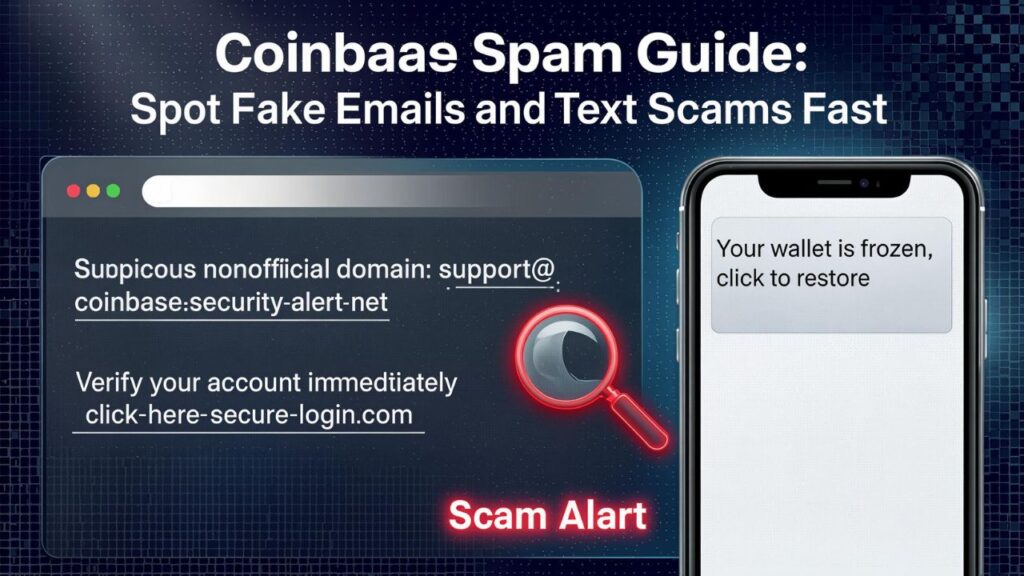
Text scams often feel more urgent than emails because they appear directly on your phone. They may claim that a withdrawal, password reset, or new device login has occurred.
Some scams include a fake verification code or ask you to call a number. The goal is to make the message feel like a real security alert.
Coinbase’s phishing guidance warns that scammers may impersonate Coinbase and pressure users into moving funds, and that no one should ask for passwords, 2FA codes, or transfers to a new address, account, vault, or wallet.
Fake Support Phone Calls
A scammer may call and claim to be from Coinbase security, fraud prevention, or customer support. They may already know your name, email, or partial account details from leaked data, old breaches, public records, or other sources.
Then they create panic: “Your account is being drained right now.” From there, they may ask you to install screen-sharing software, reveal a code, or transfer assets to a “secure wallet.”
Real support will not ask for your password, recovery phrase, or 2-step verification codes.
Fake Support Websites
Some scams begin when users search for Coinbase support online. A fake website or sponsored ad may display a phone number claiming to be Coinbase customer service.
The FTC warns that scammers often use pop-ups, messages, or fake support numbers to impersonate companies, and clicking links or calling numbers in these messages can connect people directly to scammers.
A safe habit is to go directly to Coinbase’s official website or app instead of using phone numbers from random search results, emails, or texts.
How to Spot Fake Coinbase Emails
A fake Coinbase email can be subtle, but there are usually clues. The trick is to slow down and inspect the message before clicking anything.
Check the Sender Carefully
Coinbase says its email addresses always end with “coinbase.com,” and provides examples such as @mail.coinbase.com, help@coinbase.com, and no-reply@coinbase.com.
However, scammers can make display names look real. The visible name might say “Coinbase Support,” but the actual email address may be unrelated.
Look for small tricks like:
- coinbase-support-security.com
- coinbạse.com with unusual characters
- coinbase.verify-account.net
- support-coinbase-mail.com
- Gmail, Outlook, or Yahoo addresses pretending to be Coinbase
- Extra words before or after the domain
The real sender domain matters more than the display name.
Avoid Clicking Login Buttons
A fake email’s main goal is usually to get you to click. Instead of clicking the button, open your browser or Coinbase app manually and sign in from there.
If there is a real issue, you should see it inside your account.
Watch for Pressure Language
Scam emails often create artificial deadlines. They may say you have 15 minutes, 30 minutes, or 24 hours to act. Real security issues can be urgent, but a legitimate company will not need your password or 2FA code by email.
Look for Odd Formatting
Some fake emails are polished. Others still reveal themselves through:
- Awkward grammar
- Poor spacing
- Blurry logos
- Strange button colors
- Generic greetings
- Mismatched fonts
- Unusual links
- Threatening language
No single clue proves a message is fake, but multiple clues should make you stop.
How to Spot Fake Coinbase Texts
Text scams are dangerous because phones encourage quick reactions. A fake text may appear while you are busy, tired, or away from your computer.
Be Suspicious of Links in Text Messages
A text that says “Click here to secure your account” should be treated carefully. Do not log in through links in unexpected messages.
Open the Coinbase app directly instead.
Do Not Call Numbers From Suspicious Texts
Many fake texts include a phone number and say something like, “If this wasn’t you, call immediately.” That number may connect you to a scammer pretending to be Coinbase support.
Once on the phone, the scammer may sound calm, professional, and helpful. That is part of the trap.
Never Share Verification Codes
A 2FA code is like a temporary key. If someone asks for it, that is a major warning sign.
Coinbase states that emails from Coinbase will never ask for your 2-step verification codes. (Coinbase Help)
This same rule should guide your response to texts and phone calls too.
The Most Dangerous coinbase spam Tactics
Some scam messages are merely annoying. Others are designed to take over your account or steal funds quickly. These are the tactics that deserve extra caution.
The “Pending Withdrawal” Scam
This message says someone is withdrawing money from your Coinbase account. It may include a fake amount, fake transaction ID, or fake location.
The goal is to make you click “Cancel withdrawal” or call a fake support number. Once you do, the scammer guides you through steps that actually compromise your account.
The “Account Locked” Scam
This message says your account has been locked because of suspicious activity. It tells you to verify your identity through a link.
The fake site may collect your email, password, 2FA code, driver’s license, passport photo, selfie, or recovery information.
The “Support Agent” Scam
A scammer may claim they are from Coinbase and already “detected” fraud. They may tell you not to log in, not to contact anyone else, and not to discuss the case for security reasons.
That isolation is a red flag. Real security support does not need to isolate you from normal account protections.
The “Move Funds to a Safe Wallet” Scam
This is one of the most destructive patterns. The scammer claims your funds are unsafe and must be moved to a protected wallet, vault, or new address.
Coinbase specifically warns that no one should ask you to transfer assets to a specific or new address, account, vault, or wallet.
If someone tells you to move crypto to protect it, stop immediately.
The “Remote Access” Scam
A fake support agent may ask you to install software so they can “help secure your account.” Once they can see or control your screen, they may steal credentials, approve transactions, or guide you into revealing sensitive information.
Coinbase says its emails will never ask for remote access to your computer.
What to Do If You Receive coinbase spam
The safest response is calm, boring, and methodical. Do not click. Do not reply. Do not call the number in the message.
Step 1: Do Nothing Inside the Message
Do not use links, buttons, phone numbers, attachments, or QR codes in the suspicious message.
Step 2: Open Coinbase Directly
Open the official Coinbase app or type the official website address manually in your browser. Check your account from there.
Step 3: Check Account Activity
Look for:
- Unknown logins
- New devices
- Unexpected withdrawals
- Changed email settings
- New payment methods
- Security alerts inside the app
- Open support cases you did not create
If nothing appears inside your real account, the message was likely a scam attempt.
Step 4: Report the Message
Coinbase asks users who receive phishing emails impersonating Coinbase to forward them to security@coinbase.com.
For phishing sites, Coinbase says to email security@coinbase.com with the full URL, and if the phishing attempt came by email, include full email headers.
After reporting, delete the message and block the sender if possible. Do not keep reopening the message unless you need it for reporting.
![Image: A safety checklist showing: don’t click, open app directly, check activity, report, delete.]
What to Do If You Clicked a Fake Link
Clicking a link does not always mean your account is compromised. The real danger depends on what happened next.
If You Only Opened the Page
Close the page. Do not enter anything. Clear your browser history if needed, and avoid returning to the site.
Then open Coinbase directly and check your account activity.
If You Entered Your Password
Change your Coinbase password immediately from the official app or website. Use a unique password you do not use anywhere else.
Then change the password for your email account too, especially if the same password was used anywhere.
If You Entered a 2FA Code
Act quickly. A scammer may have tried to log in using that code. Lock your account if you see suspicious activity, change your password, and review your security settings.
Coinbase’s support pages advise users who feel something is off to lock the account in-app and email security@coinbase.com.
If You Installed Remote Access Software
Disconnect from the internet, uninstall the software, run a security scan, and use a different trusted device to change important passwords.
Check not only Coinbase, but also your email, bank, cloud storage, password manager, and other crypto accounts.
If You Sent Crypto
Crypto transfers are often irreversible. Save all transaction IDs, wallet addresses, messages, emails, phone numbers, screenshots, and timestamps.
Report the incident to Coinbase, your wallet provider if relevant, and local law enforcement or cybercrime reporting agencies in your country.
How to Protect Your Coinbase Account
Stopping coinbase spam is not only about spotting fake messages. It is also about making your account harder to compromise if a scammer gets one piece of information.
Use Strong Two-Factor Authentication
Authenticator apps and hardware security keys are generally stronger than SMS-based 2FA because phone numbers can be targeted through SIM-swap attacks.
Use the strongest option available to you and keep backup codes stored safely offline.
Secure Your Email First
Your email account is the front door to many financial accounts. If someone controls your email, they may reset passwords or intercept alerts.
Protect your email with:
- A unique password
- Strong 2FA
- Recovery options you recognize
- No old forwarding rules
- No unknown logged-in devices
- A secure password manager
Use a Password Manager
A password manager helps in two ways. It creates strong unique passwords, and it may refuse to autofill on fake domains.
That means if you land on a phishing site, your password manager may give you a clue that the page is not real.
Review Connected Devices
Regularly check which devices and sessions are connected to your Coinbase and email accounts. Remove anything you do not recognize.
Keep Software Updated
Update your phone, browser, operating system, wallet apps, antivirus tools, and Coinbase app. Security updates matter because scammers often rely on old vulnerabilities and careless habits.
How Coinbase Spam Targets Wallet Users
Not every scam focuses on Coinbase exchange accounts. Some target Coinbase Wallet users or crypto wallet holders more broadly.
Coinbase Wallet is self-custody, meaning users control their own recovery phrase. That phrase must never be shared with anyone.
Fake Airdrops and Tokens
A scammer may send a random token to your wallet. When you search for it, you may find a fake claim page that asks for wallet permissions.
The token itself may be bait. The danger is the website you visit or the transaction you sign.
Malicious Wallet Approvals
Some phishing pages do not ask for a password. Instead, they ask you to connect your wallet and approve a transaction.
The transaction may allow a malicious contract to spend your tokens. Always read wallet prompts carefully.
Recovery Phrase Theft
No real Coinbase employee, wallet support agent, or security specialist should ask for your recovery phrase. Anyone who asks for it is trying to access your wallet.
How Businesses and Creators Can Handle Coinbase Impersonation
Businesses, creators, and public figures can be targeted too. A scammer may impersonate a company employee, founder, influencer, NFT project, or investment group using Coinbase-related language.
Protect Your Audience
If you manage a community, post clear rules:
- You will never ask for seed phrases
- You will never DM first about account recovery
- You will not ask users to transfer funds for support
- Official links should be listed in one trusted place
- Suspicious messages should be reported to moderators
Monitor Fake Profiles
Scammers often copy profile pictures, bios, and usernames. Regularly search for impersonators and report fake accounts.
Use Clear Communication Channels
The fewer unofficial channels people rely on, the safer they are. Keep support, announcements, and security updates centralized.
How to Report coinbase spam
Reporting helps platforms, email providers, and security teams identify scam campaigns. It may not undo damage immediately, but it can help stop future victims.
Report to Coinbase
Forward suspicious Coinbase impersonation emails to security@coinbase.com. Coinbase also asks for full email headers when reporting phishing emails because they help investigators identify the mail path.
For phishing websites, include the full URL.
Report to Your Email or Phone Provider
Mark the message as spam or phishing in your email app. For text messages, use your carrier’s spam reporting tools where available.
Report to Consumer Protection Agencies
In the United States, the FTC provides guidance on cryptocurrency scams and warns that scammers often impersonate businesses, government agencies, and support services.
Other countries have their own cybercrime and fraud reporting agencies.
Coinbase Spam vs Real Coinbase Communication
Real Coinbase communication can include account alerts, transaction notifications, identity checks, product updates, and security reminders. The difference is that real communication should not demand sensitive secrets or force you through suspicious links.
Real Coinbase Messages Should Not Ask For
Be cautious if any message asks for:
- Your password
- Your 2FA code
- Remote access to your device
- Your recovery phrase
- A crypto transfer to “secure” funds
- Payment to unlock your account
- A private key
- A screen-sharing session
- Wallet approval without clear reason
Coinbase’s official guidance says Coinbase emails never ask for passwords, 2-step verification codes, or remote access.
A Safe Rule to Follow
When in doubt, do not interact with the message. Go directly to the official app or website and check from there.
This one habit can prevent most phishing damage.
Everyday Habits That Reduce Risk
Good security is not one dramatic action. It is a collection of small habits repeated consistently.
Slow Down Before Acting
Scammers want speed. Give yourself time. Even a 60-second pause can break the emotional spell of a fake warning.
Use Bookmarks
Bookmark the official Coinbase site and use that instead of links in emails or search ads.
Separate Crypto Email From Public Email
Consider using a dedicated email address for financial accounts. Do not post it publicly or use it for newsletters, forums, giveaways, or social media.
Avoid Sharing Account Details Online
Do not post screenshots that show balances, email addresses, transaction IDs, device names, or partial account information. Small details can help scammers personalize attacks.
Review Security Monthly
Once a month, review passwords, 2FA, devices, email forwarding rules, and account activity. A quick check can catch problems early.
FAQ
What is coinbase spam?
coinbase spam is any unwanted or deceptive message that uses Coinbase’s name, branding, or account-security language to trick people into clicking links, sharing sensitive information, calling fake support, or moving crypto.
How do I know if a Coinbase email is real?
Check the sender domain carefully. Coinbase says its email addresses always end with “coinbase.com,” and real Coinbase emails will not ask for your password, 2FA code, or remote access to your device.
What should I do if I receive a fake Coinbase email?
Do not click links or reply. Forward the suspicious email to security@coinbase.com, ideally with full email headers, then delete it.
Can Coinbase support call me and ask for my password?
No. Treat any request for your password, 2FA code, recovery phrase, private key, or remote computer access as a scam.
What happens if I clicked a Coinbase phishing link?
Close the page immediately. If you entered login details, change your password from the official Coinbase app or website, review account activity, secure your email, and update 2FA.
Is a Coinbase text message with a phone number safe?
Be careful. Scammers often send texts with fake support numbers. Do not call numbers from suspicious messages. Open the official Coinbase app or website directly.
Why do I get Coinbase spam if I do not have an account?
Scammers send messages in bulk. They may not know whether you have an account. They rely on curiosity, fear, or coincidence to get people to click.
Can a scammer steal crypto without my password?
Yes, in some cases. If you approve a malicious wallet transaction, share a recovery phrase, install remote-access software, or transfer funds to a scam address, a password may not be needed.
Where can I report Coinbase phishing websites?
Coinbase says users can report phishing sites by emailing security@coinbase.com with the full URL.
How can I reduce Coinbase spam?
Use a private email for financial accounts, avoid posting personal details online, mark scam messages as spam, block suspicious senders, and never interact with links from unexpected messages.
Conclusion
coinbase spam works because it targets fear at exactly the wrong moment. A message about a locked account, suspicious login, or pending withdrawal can make anyone feel rushed.
The safest response is simple: pause, avoid the link, open Coinbase directly, check your account from the official app or website, and report suspicious messages. Never share passwords, 2FA codes, recovery phrases, private keys, or remote access with anyone claiming to help.
Crypto security is not about being paranoid. It is about building calm habits that protect you when a convincing fake message appears. Once you know the patterns, coinbase spam becomes much easier to recognize—and much less powerful.